Odoo 20 Lands Next Week. If You're on Odoo 16 or 17, You Have a Decision to Make.
Odoo 20 launches 24 September. What's confirmed, which versions lose support, and an honest upgrade-or-wait decision for businesses on Odoo 16, 17 and 18.
Every September, my inbox fills up with the same message in slightly different words: "Odoo's launching a new version. Do we need to do anything?"
This year the answer is a little sharper than usual.
Odoo 20 gets unveiled by Fabien Pinckaers at the Odoo Experience keynote in Brussels on 24 September, and it ships to everyone a few weeks after that. Odoo Experience India in Gandhinagar gave us the first previews last week. That part is exciting, and I'll get to what's in it.
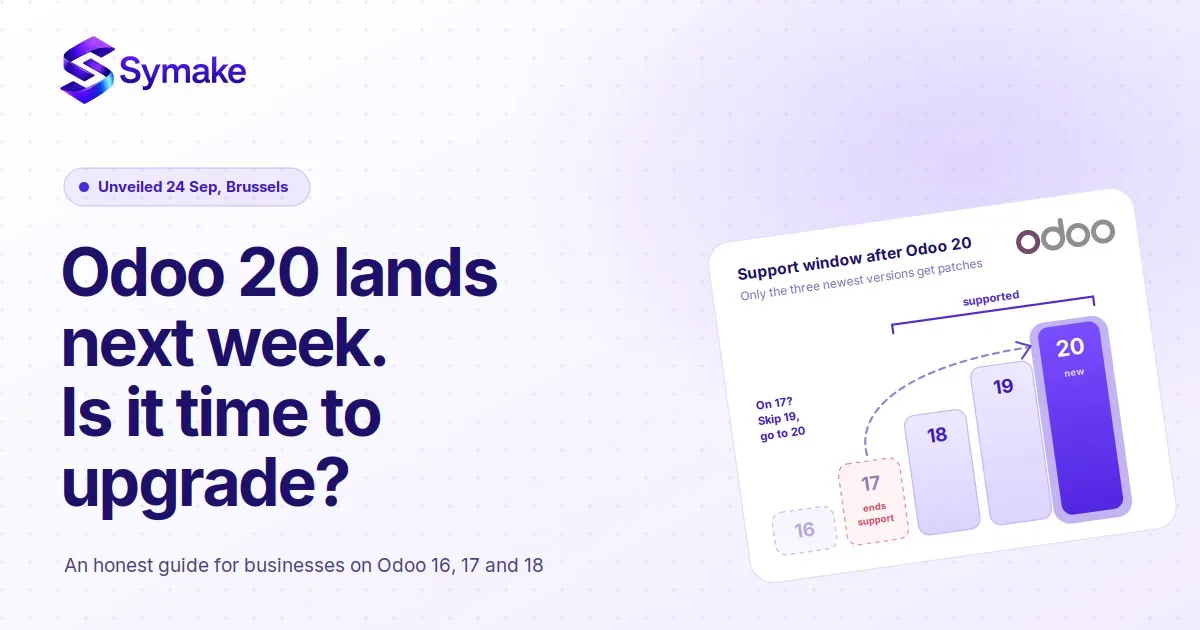
But there's a less exciting part that matters more for a lot of the businesses we work with. Odoo supports its three most recent major versions. Right now that's 17, 18 and 19. The day Odoo 20 becomes generally available, that window becomes 18, 19 and 20 — and Odoo 17 quietly drops out.
If you're on 17, that's the version you probably went live on in 2024 or early 2025. It still feels new. It is about to be unsupported. And if you're on 16 or earlier, you've been out of the window for a while and may not have noticed, because nothing breaks on the day support ends. It just gets slowly more expensive to fix things.
So this post is really two things: what Odoo 20 actually brings, and what to do about it depending on which version you're on.
What's actually confirmed in Odoo 20
A quick caveat: Odoo publishes a roadmap at Partner Days in April, then reveals the real thing in September. The roadmap itself is jokingly titled "a list of things we will maybe do." So treat everything below as what Odoo has shown or stated, not a guarantee — the final feature list gets locked next week.
With that said, here's what has been demonstrated or announced so far, grouped the way a business owner would care about it.
AI that does things, not just chats. This is the headline. Odoo 20 ships a native MCP server for Enterprise customers, which means any AI assistant that speaks the Model Context Protocol can connect straight to your Odoo — no middleware, no custom connector. We wrote about why that matters in our Dreamforce and Odoo 20 post, and the short version is: your ERP becomes something an agent can read from and act on. On top of that, Odoo has shown a database-wide natural-language search ("find the last PO from this supplier," "summarise the complaints on these tickets"), an AI sidekick that summarises chatter threads and drafts replies from similar past tickets, and agents that can, for example, find all unwon leads assigned to a rep and reassign them by rules you set.
Accounting gets more direct. Direct payments from inside Odoo, improved reconciliation views built to work for a two-person finance team as well as a large department, and forecasting that uses budgets and actuals together rather than static plans.
A rebuilt mobile experience. A fully redesigned mobile interface with proper touch support, on top of an upgrade to Owl 3 (Odoo's frontend framework). If your field sales or warehouse team lives on phones, this is the one to watch in the keynote.
Performance at scale. A read-replica database architecture, which is a technical way of saying Odoo can spread the load of reporting and heavy reads across more than one database. For growing businesses this is the difference between "Odoo gets slow at month-end" and "Odoo doesn't."
Under the hood. A new external JSON-2 API, a unified permission model, Python 3.12 as the minimum, and a newer PostgreSQL floor. You won't see these on a dashboard, but they're the reason custom modules built for 15 or 16 will need real work to come across.
Smaller things that add up. Services and Planning merging, a payroll overhaul, group sharing in Documents and Knowledge, Sign automation tied into workflows, and audio/video transcripts inside Discuss.
If you want the pattern: Odoo 19 was about adding capability everywhere. Odoo 20 is about taking work off your team — AI, automation, simplification. That's a different kind of release, and it changes the upgrade math.
The support window, and why it's the real deadline
Let me be precise about this because it's where I see the most confusion.
Odoo's policy is that the three most recent major versions are supported. Supported means security patches, bug fixes, and — for Odoo Online and Odoo.sh customers — the ability to stay on the platform. Once your version leaves the window, Online customers get pushed to upgrade, and on-premise customers are on their own for security fixes.
So here's where each version stands once Odoo 20 ships:
- Odoo 18 and 19: fully supported. No urgency.
- Odoo 17: leaves support. You have a grace period in practice, but no patches are coming.
- Odoo 16 and earlier: already out of support. Every month on these versions is borrowed time, especially for a system that holds your invoices and customer data.
The thing nobody tells you is that "out of support" doesn't feel like anything at first. Your Odoo keeps running. The pain shows up six months later when a payment gateway changes its API, or a GST rule changes, or a bank feed stops working, and the fix has to be hand-built because there's no official patch.
Upgrade now, wait, or skip a version? By where you are
I'll be direct about what I'd tell you across a table.
If you're on Odoo 19
Wait. You're on a supported version with two years of runway. Let 20.0 go through its first two or three point releases, watch what your partner and the community find, and plan an upgrade for mid-2027 when 20 is mature and 21 is on the horizon. The one exception: if the native MCP server or the mobile redesign solves a problem you're paying for today, an early move can be worth it.
If you're on Odoo 18
You have time, but start planning. You're one version from the edge of the window. The sensible move is to skip 19 entirely and go straight to 20 in the first half of 2027. Use the next few months to clean up data, list your customisations, and retire the ones nobody uses.
If you're on Odoo 17
This is the version I'm writing this post for. You're about to be unsupported, and the right target is Odoo 20, not 19 — jumping to 19 now just means doing this again in a year. Realistic timing: start scoping in October once 20.0 is out and stable, run the upgrade in a test environment through November and December, and go live in January when most businesses have a quieter operational window. Don't upgrade in the last week of a financial quarter. I've seen that go badly more than once.
If you're on Odoo 16 or earlier
You're not choosing between upgrading and waiting. You're choosing between upgrading and slowly accumulating risk. The gap between 15 or 16 and 20 is large — Owl 3, the new permission model, the API changes — so custom modules will need rewriting rather than patching, and you should budget for that honestly. In some cases it's cheaper and cleaner to treat it as a re-implementation on 20 with a data migration, rather than a version-by-version upgrade. We can usually tell which within a week of looking at your instance.
What an upgrade actually costs, and where the money goes
The licence is the easy part. Odoo Enterprise pricing doesn't change with the version, and Odoo's own upgrade service handles the standard database migration at no extra cost for Enterprise customers.
The real cost is everything that isn't standard Odoo:
Custom modules. Every customisation you've added has to be tested against the new version, and for big jumps, rewritten. This is usually 60–70% of an upgrade budget. The businesses that upgrade cheaply are the ones that resisted customising in the first place.
Third-party apps. Every app from the Odoo App Store needs a version-20 release from its vendor. Some vendors are fast; some take months; some have quietly disappeared. Check this list before anything else.
Integrations. If Odoo talks to Salesforce, a payment gateway, a shipping provider, or a GST e-invoicing service, each connection needs retesting, and the new JSON-2 API may mean re-pointing them. Our post on business system integration covers why this is where projects stall.
Data cleanup. Not strictly an upgrade cost, but every upgrade is a chance to fix duplicate customers, dead products, and half-configured workflows. If you skip it, you carry the mess into a version whose AI features will surface it in front of your whole team.
Training. Odoo 20's interface, especially on mobile, is different enough that your team needs a few hours with it. Budget for that or you'll pay for it in support tickets.
For a mid-sized business on Odoo 17 with a moderate amount of customisation, a well-run upgrade to 20 is typically a six-to-ten-week project. Heavy customisation or a jump from 15/16 can double that.
Five things to do before the keynote on 24 September
You don't have to wait for Odoo 20 to ship to get ready for it.
- Find out exactly which version you're on and how customised it is. Ask your partner for a list of custom modules and third-party apps with a line on each saying whether it's still used. You'll be surprised how many aren't.
- Write down the five things Odoo doesn't do for you today that you work around manually. Then watch the keynote with that list in hand. If Odoo 20 solves three of them natively, that's three customisations you can delete instead of migrate.
- Check your third-party apps for version-20 support. Email the vendors now. Their answer, or their silence, tells you a lot.
- Clean your customer and product masters. This is the least glamorous job in the business and it's the one that makes every AI feature in Odoo 20 actually work.
- Decide who owns the upgrade. Not "the IT guy." A named person from operations or finance who will sign off that the upgraded system does what the business needs. Upgrades fail when nobody on the business side owns them.
Where I'd be careful
A few honest warnings, because I'd rather you hear them from me than discover them.
Don't upgrade to 20.0 in the first two weeks it's out. Every major Odoo release has early bugs that get fixed fast. Let the first point release land.
Don't assume "Odoo does the upgrade for free" means the project is free. It means the standard database migration is free. Everything you added isn't standard.
Don't let the AI features drive the decision on their own. They're impressive, and the MCP server is a real shift. But an AI agent reading a messy Odoo just makes the mess faster. If you're weighing whether Odoo is even the right platform for where you're headed, our Salesforce vs Odoo comparison is a better starting point than a feature list.
And don't sit on Odoo 16 because "it works." It works until it doesn't, and the cost of that moment is always higher than the upgrade would have been.
Next week is the reveal. The next four months are the work.
Odoo 20 looks like the most significant release in a few years — not because of any single feature, but because it's the version where Odoo starts doing things for you rather than just recording what you did.
For most growing businesses, the right response isn't excitement or panic. It's a calm look at which version you're on, how much you've customised it, and a plan that gets you onto 20 in the first quarter of 2027 without a crisis forcing the timing.
We implement and upgrade Odoo for manufacturing, trading and services businesses across South India, and we'll be going through the Odoo 20 release line by line the week it drops. If you want a straight answer on what your specific instance needs — and what it'll cost — talk to our team. We'll look at your setup and give you the honest version before you commit to anything.
People Also Ask (FAQs)
When is Odoo 20 being released?
Odoo 20 is unveiled at the Odoo Experience keynote in Brussels on 24 September 2026, with general availability expected a few weeks later. Odoo Experience India in Gandhinagar on 11–12 September gave early previews. Odoo has followed an annual major release every autumn for years.
Which Odoo versions are supported once Odoo 20 is out?
Odoo supports its three most recent major versions. After Odoo 20 ships, that means Odoo 18, 19 and 20. Odoo 17 leaves the support window, and Odoo 16 and earlier are already unsupported.
What are the main new features in Odoo 20?
Based on Odoo's roadmap and previews: a native MCP server so AI agents can connect directly to Odoo, database-wide natural-language search, an AI sidekick that summarises conversations and drafts replies, direct payments and improved reconciliation in Accounting, a fully redesigned mobile interface on Owl 3, a read-replica database architecture for performance, a new JSON-2 API, and a unified permission model. Final details are confirmed at the 24 September keynote.
Should I upgrade from Odoo 17 to Odoo 19 or Odoo 20?
Go to 20. Upgrading to 19 now means repeating the project in a year. Wait for the first point release of 20, scope the upgrade in October, test through November and December, and go live in a quiet operational window in early 2027.
Is the Odoo upgrade free?
Odoo's upgrade service migrates a standard Enterprise database to the new version at no additional cost. Custom modules, third-party apps, integrations, data cleanup and training are not included, and they typically make up most of the real cost of an upgrade.
How long does an Odoo 20 upgrade take?
For a mid-sized business on Odoo 17 with moderate customisation, six to ten weeks is typical. Jumping from Odoo 15 or 16, or upgrading a heavily customised instance, can take two to four months and may be better handled as a re-implementation with a data migration.