Salesforce for Real Estate: The Presales, Sales and Post-Sales Modules Builders Actually Need
Salesforce has no ready-made Real Estate Cloud. Here's how builders assemble presales, sales and post-sales modules from the products it does offer.
Salesforce modules for real estate presales, sales and post-sales
The first thing most developers ask me is, "Does Salesforce have a real estate product?"
Not in the way you might hope. When I checked Salesforce's own real estate page, there was no "Real Estate Cloud" to buy. The page tells you to build your solution from products you already know: Sales Cloud, Marketing Cloud, Data 360, Agentforce, Tableau and Slack, plus a few real estate features such as a Dealroom app for customer approvals. Its one named customer endorsement is from Lennar, a US homebuilder, and it gives no numbers.
That's not a criticism. It's actually the right way to think about it. A builder in Kochi selling apartments with construction-linked payment plans has different needs from a US brokerage leasing offices, and a one-size product would fit neither well. But it does mean that the real work is deciding which modules to assemble, and in what order. That's what this post is about.
If you haven't read it, last week's piece on why buyers go cold after the site visit covers the "why". This one covers the "what to build".
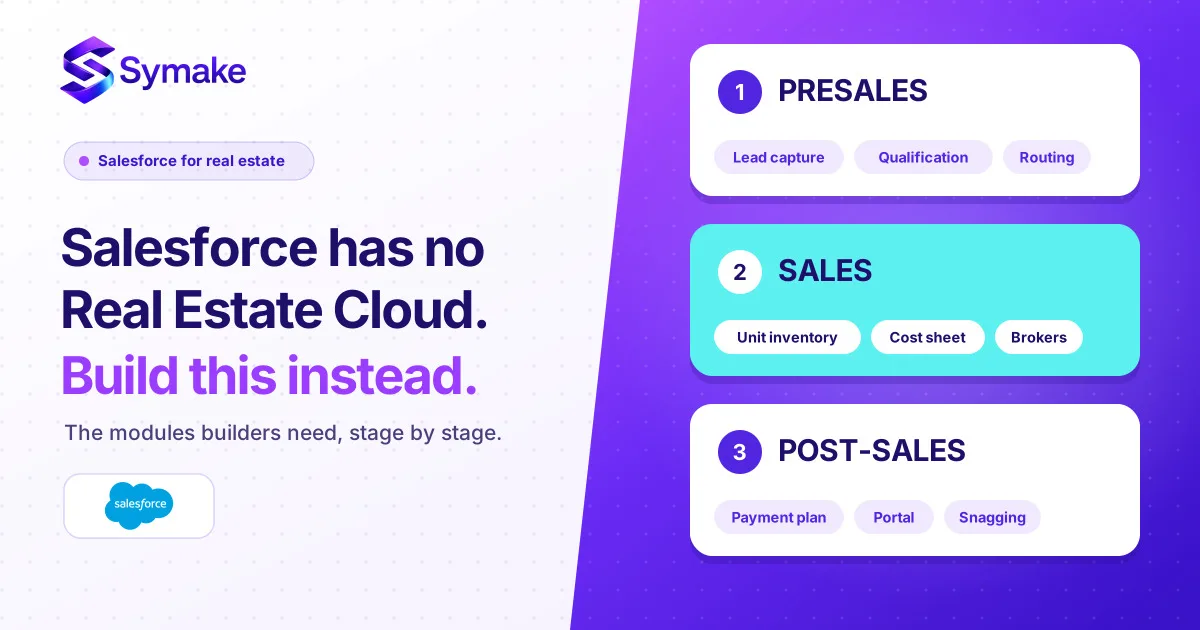
I'll walk through the buyer's journey in three stages: presales, sales and post-sales.
Presales: turning attention into qualified interest
Presales is everything that happens before a salesperson sits down with a serious buyer. It's where volume lives and where most leads are noise.
Lead capture and de-duplication. Every source feeds one lead record: portals, ads, walk-ins, WhatsApp, channel partners, your website. The one rule that saves the most pain is de-duplicating on phone number, because the same family will enquire through three doors. In Salesforce this is standard Sales Cloud lead management with duplicate rules, plus integrations for your portals and messaging channels.
Campaign and source tracking. Marketing Cloud, or the campaign features in Sales Cloud, let you tie each lead to the campaign and project that produced it. The question you're after is not "how many leads?" but "which hoarding, which portal and which launch event produced bookings?"
Qualification. A short, consistent set of questions: budget, timeline, financing, preferred configuration, purpose (own use or investment). Tata Realty reports that AI-assisted qualification across WhatsApp, SMS and email improved its lead qualification by 30%, but that's a self-reported figure from a joint press release with Salesforce, so take it as a direction, not a forecast. What I'd stress is the principle: qualify early, consistently and in one place, so your best salespeople spend their time on real buyers.
Response-time rules. Assignment rules give each lead an owner by project, language or round-robin, and a timer escalates anything untouched. This is plain configuration, not an expensive add-on.
Sales: from site visit to booking
This is where the money is made, and where generic CRMs fall short, because real estate has a product that most CRMs don't model well: inventory.
Project and unit inventory. You need Project, Tower, Floor and Unit as records (typically custom objects), with status: available, on hold, booked, sold. Salespeople should see live availability and price on their phones. The first time two executives promise the same flat to two buyers, you'll wish you'd built this earlier.
Site visits and follow-up. Visits are scheduled as events, and marking a visit "done" creates the next tasks automatically: send the cost sheet, call within 48 hours, invite a re-visit. This is the single highest-value automation I put in, and it's configuration, not code.
Pricing and cost sheets. Real estate pricing is rarely a single number. It's base rate, floor rise, preferred location charges, parking, club membership, GST and registration, with offers layered on. Salesforce's quoting tools can handle this, and Salesforce's Revenue Cloud page describes pricing and approval rules on one platform. A caution: Salesforce CPQ is now end of sale, with Revenue Cloud as the recommended successor, so if you're starting fresh, ask your partner which is right for you, and don't assume a quoting product is needed at all. For many builders, a well-built cost sheet on the unit record with a discount-approval flow does the job.
Discount and deal approvals. Sales heads want control over concessions. Approval flows route a discount request to the right person, and Salesforce's Dealroom feature is aimed at customer approvals on deals. The point is that every discount has a name against it.
Channel partners and brokers. Partners are their own record. Each lead is tied to the partner who brought it, and the commission is tracked from booking through to payout. With Experience Cloud (Salesforce's portal product), partners can log leads and check status themselves, which cuts the "I brought that buyer first" arguments. This is a pattern we build on the platform, not a Salesforce real estate feature.
Booking. When a buyer pays the token amount, the unit moves to "booked", the booking form and documents are generated, and the record hands over to post-sales. A clean handoff here avoids the buyer repeating themselves to a new team.
Post-sales: where trust is kept or lost
After booking, the buyer is making payments over months or years while their home is being built. This is where many developers' systems fall apart, because the buyer's questions now cross sales, finance and construction.
Payment schedule and demand letters. The buyer's payment plan, often linked to construction milestones (plinth, slab, finishing), lives on the booking record. When a milestone is reached, the system raises the demand, sends it, tracks the receipt and flags overdue instalments. Salesforce's Revenue Cloud Billing product is described as supporting any charge type or payment schedule, and a custom build on the booking record is the other route. In either case, many developers keep their accounting in a separate system, and the CRM needs to talk to it. If finance runs in a tool like Tally or an ERP, plan the integration early.
Loan and documentation tracking. Most buyers take a home loan, and the delays are usually in paperwork: sanction letters, disbursement requests, agreement drafts, registration dates. A checklist per booking, with owners and due dates, prevents the "where is my agreement?" call.
Customer portal. A buyer portal, again via Experience Cloud, gives each family one place to see their payment schedule, download receipts and demand letters, check construction progress photos and raise a query. This one feature cuts a surprising number of phone calls.
Service requests and snagging. As handover approaches, buyers log defects. Service Cloud gives you cases with owners and deadlines, and Field Service can schedule technicians for rectification visits. Tracking snags to closure, with photos, makes handover far less painful. These are standard Salesforce tools applied to a real estate process, not a packaged real estate product.
Referrals and resale. A happy owner is your cheapest lead source. Post-handover, keep the record alive: ask for referrals, track resale and rental interest, and invite them to your next launch.
At a glance
| Stage |
Module |
Salesforce building block |
Notes |
| Presales |
Lead capture and de-duplication |
Sales Cloud |
Standard; integrate portals and WhatsApp |
| Presales |
Campaign and source tracking |
Campaigns / Marketing Cloud |
Tie spend to bookings |
| Presales |
Qualification and routing |
Sales Cloud, Agentforce (optional) |
AI-assisted qualification is optional |
| Sales |
Project and unit inventory |
Custom objects |
Core of any real estate build |
| Sales |
Site visits and follow-up tasks |
Sales Cloud flows |
Highest-value automation |
| Sales |
Cost sheets and approvals |
Sales Cloud / Revenue Cloud, approval flows |
Check whether you need a quoting product |
| Sales |
Broker and partner management |
Experience Cloud + custom objects |
Commission tracking is custom |
| Sales |
Booking and handoff |
Sales Cloud, document generation |
Unit status moves to booked |
| Post-sales |
Payment schedule and demand letters |
Custom build or Revenue Cloud Billing |
Integrate with your accounts system |
| Post-sales |
Loan and documentation tracker |
Flows and tasks |
Checklist per booking |
| Post-sales |
Customer portal |
Experience Cloud |
One place for the buyer |
| Post-sales |
Snagging and service |
Service Cloud, Field Service |
Cases with owners and deadlines |
| Post-sales |
Referrals and resale |
Sales Cloud, Marketing Cloud |
Keep the relationship alive |
The order I'd build in
Don't build all of this at once. Here's the sequence that has worked for us.
Start with presales and the front half of sales: one front door for leads, the response timer, the unit inventory and the site-visit follow-up automation. That's where leads leak, and it's visible to your sales head within weeks. Next, add booking, cost sheets, approvals and the broker channel. Then build the post-sales layer, starting with the payment schedule and demand letters, because that's where finance and your buyers feel pain. Finish with the portal and snagging. L&T Realty's Salesforce case study describes a similar journey: it started by replacing paper forms and fragmented systems with a connected view, and reports an 80% faster lead response and about 20% more calls handled. As with Tata Realty's figures, these are vendor-published, so use them as a direction of travel.
A quick word on cost. Salesforce's editions and pricing changed this autumn, so the licence you need depends on the features you want, especially AI. We covered that in our look at the new Core, Advanced and Max editions. And if you're weighing Salesforce against an all-in-one ERP route, see Salesforce vs. Odoo by business size and budget.
Conclusion
Salesforce won't hand you a finished real estate system, and I'd be suspicious of any partner who says it will. What it gives you is a flexible set of building blocks. The skill lies in choosing the right modules, modelling your inventory and payment plans properly, and building in an order that shows value quickly.
At Symake, we design and implement Salesforce for real estate developers and brokerages from our offices in Bengaluru and Kerala. If you'd like a module-by-module plan for your projects, with a sensible build order and an honest view of cost, talk to our team. Our guide to choosing a Salesforce implementation partner is a good read before you do.
People Also Ask (FAQs)
Does Salesforce have a real estate product?
Not a single packaged "Real Estate Cloud". Salesforce's real estate page recommends building a solution from existing products such as Sales Cloud, Marketing Cloud, Data 360, Agentforce and Tableau. Developers typically combine these with custom objects for projects and units, and sometimes AppExchange apps from third parties.
What modules does a real estate developer need in Salesforce?
At presales: lead capture, source tracking and qualification. At sales: project and unit inventory, site-visit follow-up, cost sheets, discount approvals, broker management and booking. At post-sales: payment schedules and demand letters, loan and documentation tracking, a customer portal, snagging and referrals.
Can Salesforce manage unit inventory and availability?
Yes, by modelling Project, Tower, Floor and Unit as custom records with a status such as available, on hold, booked or sold. This isn't a ready-made feature, so it needs to be designed for your projects, but once built, salespeople can see live availability and price.
Can Salesforce handle construction-linked payment plans?
It can, either through a custom build on the booking record or, for more complex billing, through Salesforce's Revenue Cloud Billing, which Salesforce describes as supporting any charge type or payment schedule. Most developers also need to integrate with their accounting system.
How do channel partners and brokers work in Salesforce?
You record each partner, tie each lead to the partner who brought it, and track commission through to payout. With Experience Cloud, partners can log leads and see status in a portal. The commission rules are usually custom to your business.
Is Salesforce CPQ still available for real estate pricing?
Salesforce says CPQ is end of sale, not end of life, so existing customers still get support, and Revenue Cloud is the recommended successor. For many builders, a cost sheet on the unit record with an approval flow is enough, so check whether you need a quoting product before buying one.
How long does a Salesforce real estate implementation take?
It depends on the number of projects, how complex your pricing and payment plans are, and how many systems you need to integrate. A phased approach starting with lead handling and unit inventory can show results within weeks, while the full post-sales layer takes longer. A scoped assessment is the only reliable way to estimate.